Add Long-Press Shortcut for Recently Played Games in LaunchBox App
Originally posted here:
My request is for long press shortcuts on the Android LaunchBox app. These shortcuts could show the most recently played games and take you straight to them.
It’d work similar to how my Discord app in the picture shows below, these are my recent forums and clicking them takes me straight to them:
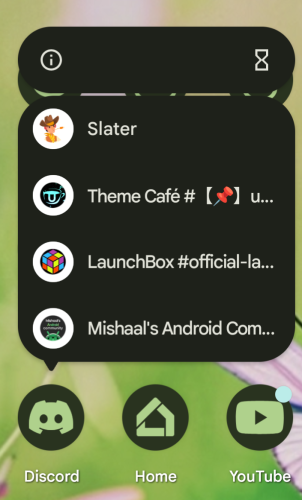
My thought is that this could be an easy way to reopen the a game that you’ve previously played in LaunchBox. So instead of;
Pressing and loading Launchbox,
Waiting for the startup screen,
Choosing the platform,
Navigating to the game,
Clicking it and pressing play and then your emulator opens
The workflow would be;
Long press Launchbox
Choose recently played game
Ideally the game starts playing in your emulator (Or if not possible the game page opens in LaunchBox for that game)
I’ve not seen this functionality in any other Android games emulation frontend and it would be a great time saver. Sometimes you just want to get back to your game as quickly as possible and this would be a great feature.
Please authenticate to join the conversation.
Open To Community

LaunchBox for Android
Over 1 year ago

ChunkyLoverMark
Subscribe to post
Get notified by email when there are changes.
Open To Community
LaunchBox for Android
Over 1 year ago
ChunkyLoverMark
Subscribe to post
Get notified by email when there are changes.