RetroAchievements Playtime Stats Integration
📋 Summary
Integrate Playtime Stats from RetroAchievements into LaunchBox and Big Box, allowing users to view average completion times and play durations reported by the RetroAchievements community—similar to features provided by HowLongToBeat (HLTB).
🎯 Feature Overview
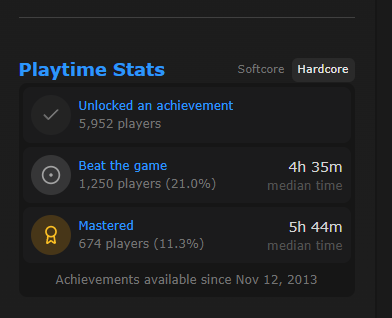
RetroAchievements recently introduced a Playtime Stats section for each game, showing:
🕒 Average playtime to finish the main game.
🏆 Average time to master all achievements.
📊 Community-based playtime data gathered from real players.
LaunchBox could display this information:
In the Game Details Pane (e.g., under the RetroAchievements badge).
Within Big Box under a game’s stats or overview section.
Optional enhancement: include this data in filters and sorting options (e.g., “Games under 5 hours,” “Longest average playtime”).
🛠 Example Use Case
A player browsing their NES library wants to find short games to complete in one sitting.
LaunchBox displays RetroAchievements’ “Average Playtime” under each game’s details, helping them choose quickly.
📦 Benefits
⏳ Provides gameplay length insights directly in LaunchBox and Big Box.
🎮 Helps players prioritize shorter or longer games for their mood or time available.
🔗 Strengthens LaunchBox’s existing RetroAchievements integration.
💡 A solid alternative to HowLongToBeat integration, using already linked RetroAchievements data.
Please authenticate to join the conversation.
Completed

LaunchBox for Windows
13.27
8 months ago

SqHd52
Subscribe to post
Get notified by email when there are changes.
Completed
LaunchBox for Windows
13.27
8 months ago
SqHd52
Subscribe to post
Get notified by email when there are changes.