Add Field to Set Current/Working Directory
Summary:
Add an option to define the current working directory when launching a game. This is especially useful for emulators like DOSBox, DOSBox-X, and VICE, where game configurations or fliplists rely on relative paths 📁🕹️.
Problem:
LaunchBox currently sets the working directory to the emulator’s location by default. This can cause issues with emulators like DOSBox-X, which expect to be launched from the game folder containing the config files, ISO images, and other assets. Without the correct working directory, users are forced to use unintuitive relative paths (e.g., ..\..\Games\GameFolder) or create separate configs specifically for LaunchBox—breaking compatibility with how those configs would be used outside of LaunchBox.
This also affects other emulators like VICE, where fliplists become non-portable due to absolute file paths being required.
Proposal:
Introduce an emulator-level option (e.g., a checkbox or field) to launch the emulator with the ROM directory set as the working directory. This would allow emulator configs to reference local files (like ISOs or save folders) using simple relative paths, just as they would if launched manually.
Benefits:
Restores compatibility with standard DOSBox/DOSBox-X workflows
Enables the use of portable paths in config and fliplist files
Reduces complexity and setup friction for users managing custom configs
Matches functionality already offered in other frontends like Playnite 🧠✅
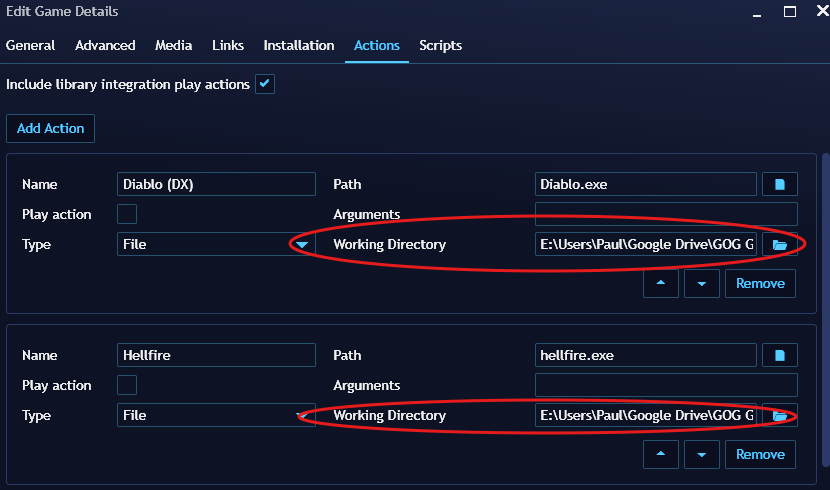
Community Insight:
This has been a long-standing request (originally submitted in 2022), particularly by users with large MS-DOS or Commodore 64 collections. It allows for cleaner config structures and simplifies LaunchBox integration with emulators that rely on path-sensitive resources.
Previously requested here:
https://bitbucket.org/jasondavidcarr/launchbox/issues/6915/emulator-option-to-set-current-directory
Please authenticate to join the conversation.
Open To Community

LaunchBox for Windows
About 1 year ago

Vesos!
Subscribe to post
Get notified by email when there are changes.
Open To Community
LaunchBox for Windows
About 1 year ago
Vesos!
Subscribe to post
Get notified by email when there are changes.